Introduction
One of the day to day activities for networking teams is configuration management. Historically the Catalyst SD-WAN solution provided the templates as the go-to method to create and assign configuration in a reusable way. Along the years, Cisco has been learning and listening to the field and the feedback was clear, the configuration management needed to improve.
Version 20.8.x was the first one to see Configuration Groups constructs, but they were quite limited. Throughout subsequent versions, new features were added to make Config groups more robust and better suited to support more and more use cases. With the announcement of 20.15 as recommended release, Configuration Groups took the stage as it’s the first version where we can consider the feature is mature enough for most use cases.
And there’s another important point: new devices that Cisco is releasing now come only with support for Configuration Groups.
So what exactly are Configuration Groups? And why should you care?
If you’re still thinking in terms of templates, this post will help you understand the new model and why it makes your life easier.
What Are Configuration Groups?
At a high level, a Configuration Group represents the full configuration of a device.
Instead of stitching together multiple feature templates like we used to, now we build configurations using a more structured and modular approach.
A Configuration Group is made of:
- Feature Profiles
- Which contain Features
- Which contain actual configuration (and variables)
Let’s break that down.
The Building Blocks
Features
Features are the smallest building blocks.
Think of them as individual configuration elements like:
- BFD
- OMP
- Interfaces
- VPN configuration
- AAA, logging, CLI add-ons
They can include:
- Global configuration
- Variables (placeholders for per-device values)
- Default value
Feature Profiles
Feature Profiles group related features together into logical sections.
For example:
- System Profile → system, AAA, logging
- Transport & Management Profile → VPN 0, interfaces, VPN 512
- Service Profile → VPNs, routing (OSPF, BGP, etc.)
- CLI Add-On Profile → custom CLI
These profiles give structure to the configuration and make it reusable across multiple deployments.
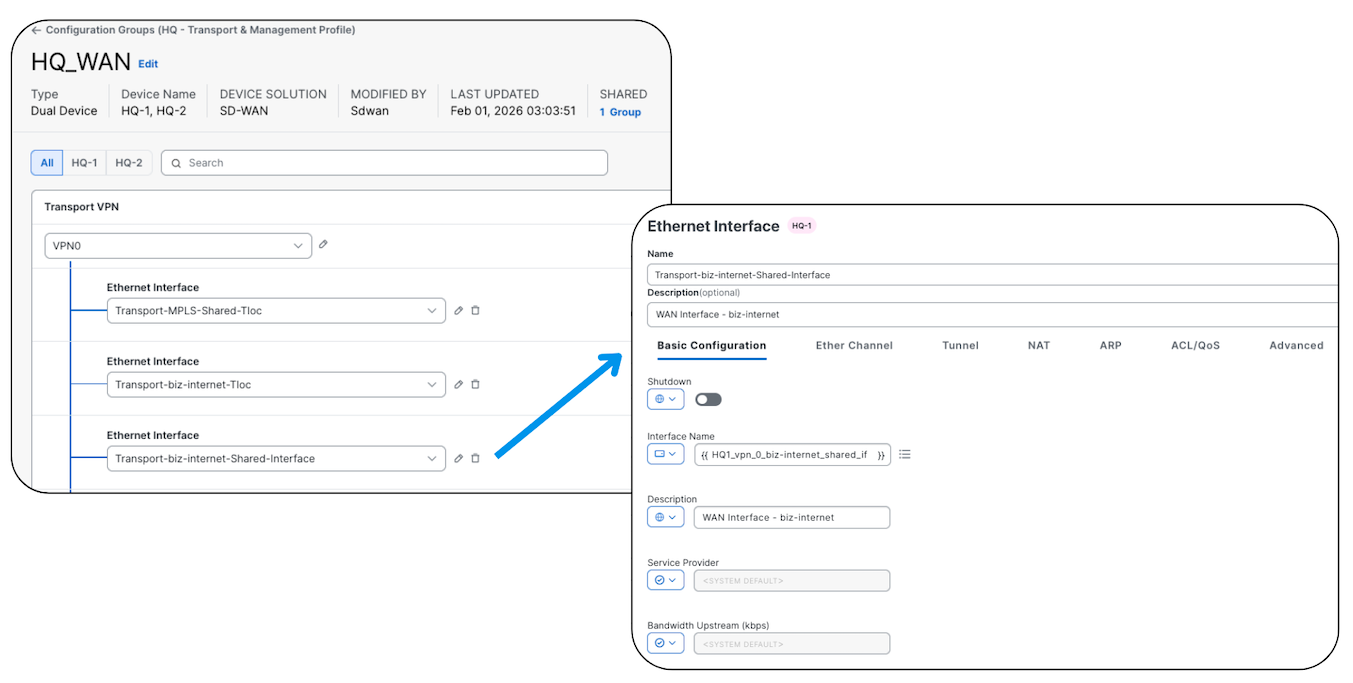
The screenshot shows an interface configuration (Interface Feature), notice the same principles that apply to templates are here.
This is covered in depth in the UX 2.0 course
Configuration Groups, Policy Groups, and topology management — with lab files and running configs.
See the Course →Configuration Groups
Now we bring everything together.
A Configuration Group:
- Combines multiple Feature Profiles
- Represents the entire configuration of a device
- Can be applied to one or many devices
- Is device model agnostic
This last point is important.
You’re no longer tightly coupling your configuration to a specific hardware model like before.
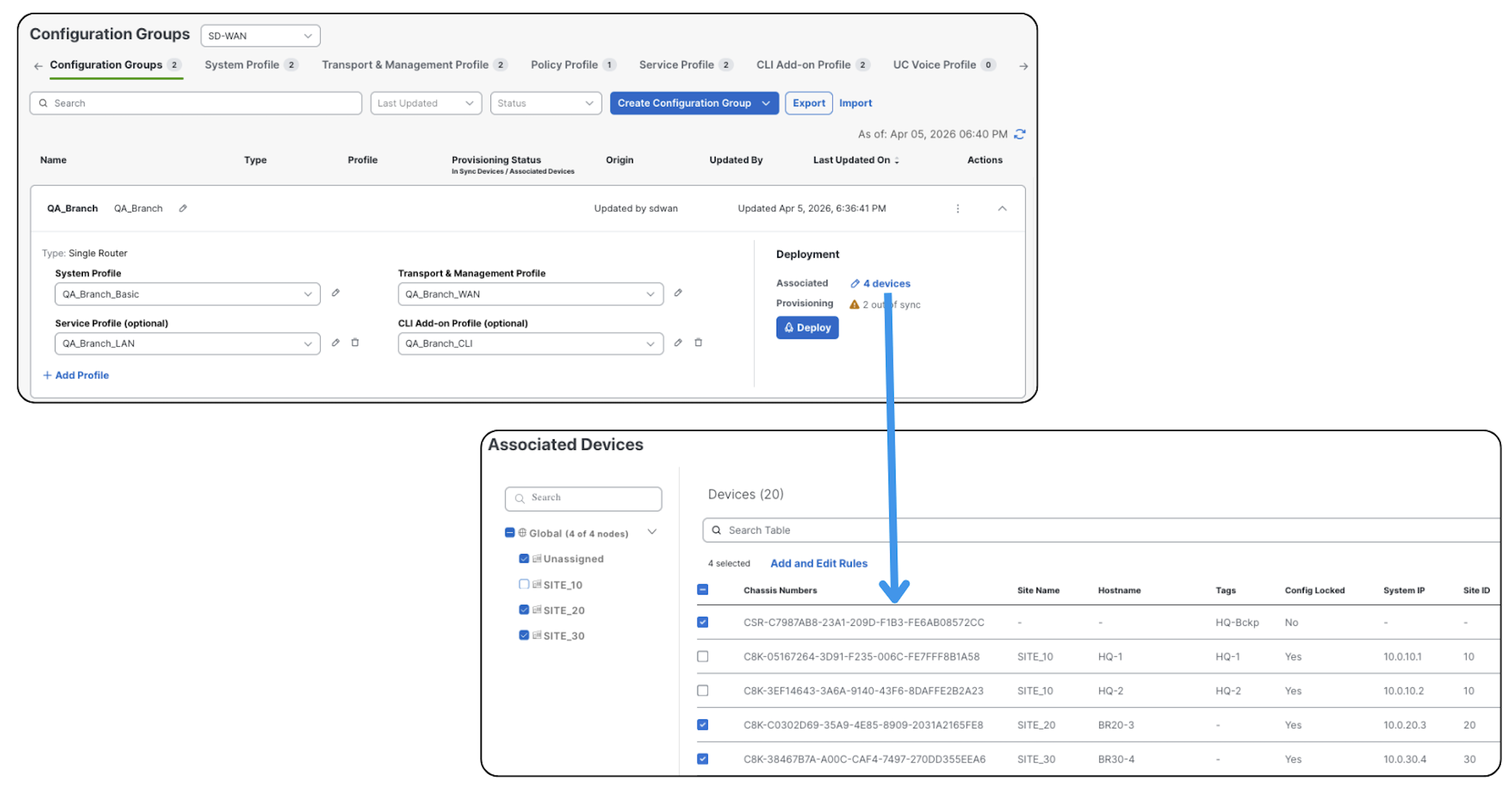
In the screenshot above, we can see different models, although both of them are virtual routers, we could very well have a Catalyst 8300, ASR1000 or any other model.
How Is This Different from Templates?
If you’ve used feature templates before, you’ll immediately notice the difference.
Here’s how I think about it.
1. Deployment Workflow
With templates:
- You modify and deploy at the same time
Configuration Groups:
- You modify first
- Then deploy when ready
This gives you more control and avoids accidental changes hitting production.
2. Deployment Granularity
Templates:
- Bulk deployment (all or nothing)
Configuration Groups:
- Selective deployment
You can push the changes to a single device (or more) instead of every device associated to it.
3. Reusability
Templates:
- Model-specific
- Harder to reuse across platforms
Configuration Groups:
- Model agnostic
- Designed for reuse across different device types
This is a big win in mixed environments.
4. Complexity
Templates:
- Non-intuitive structure
- Harder to understand dependencies
Configuration Groups:
- Guided workflow that takes you step by step through the configuration
- Cleaner structure with logical grouping
My Experience So Far
After working with Configuration Groups in the lab and with multiple customers, here’s what I’ve learned:
- The mental transition for those coming from templates can be tough. The best way to get past it is simple: get your hands dirty.
- The best way to build Configuration Groups is to reverse engineer them. Don’t start with the group — start with the device requirements, then build your Feature Profiles and Configuration Groups around that.
- The flexibility to modify and deploy at different times is golden.
- At the beginning, it’s not always obvious where each piece of configuration lives between Configuration Groups and Policy Groups. I built this tool to help with that.
- Some scenarios are more challenging to migrate. Start with Configuration Groups, then move to Policy Groups. It’s perfectly fine to run a mix of Configuration Groups and traditional policies for a while.
Key Takeaways
If you only remember three things from this post, make them these:
- Configuration Groups represent the full device configuration
- They use a structured model: Features → Feature Profiles → Configuration Group
- They replace templates with a more reusable and flexible approach
This is covered in depth in the UX 2.0 course
Configuration Groups, Policy Groups, and topology management — with lab files and running configs.
See the Course →